Dressmaker Pattern Help
Pattern Piece Missing or Disappeared?
Check the fabric, the inventory and the mannequin first, then work through the recovery steps in order. Restarting the dress is the last step, never the first.
- Cutting-room behaviour reviewed through Build 410. Panel lists taken from build 25482629. Checked 29 settembre 2026.
- 1871 panels in this build, 236 construction variants
- Build 410 added the mannequin slot hint
Every claim below says which kind of statement it is. The piece lists come out of the same cut data this site's pattern pages are built from, the inventory hint and the sketchbook change are published notes for the current build, and anything about what happens after you leave a station or reload a save is a player report rather than a feature the game promises.
01 — Where did it go?
Where did the piece go?
Pick the one that matches your screen. Four of these are recoverable on this page, and the fifth is a different problem entirely.
- I just cut itA piece you have cut is not always in your inventory yet. Look along the cloth you cut it from before anything else.
- I removed or unpicked itUndoing a seam puts the piece back somewhere rather than deleting it. The reload at the end of this list is the step that finds it again.
- It should be on the mannequinAn empty slot is waiting for a piece that is very often still sitting in the inventory or on the table.
- The commission says something is missingOne piece of the garment is usually unaccounted for, and the reason is often that it was never picked up.
- I never had this pattern at allThen nothing disappeared. The pattern itself has not been unlocked, and that question has its own page.
02 — Try these in order
Six checks, cheapest first
Stop as soon as the piece turns up. The order matters: the first three cost nothing, the next two cost a reload, and the last one costs every correct piece on the dress.
- Look along the fabric the piece was cut from. A cut panel can stay on the cloth instead of moving across.From the build's own cut lists
- Read the cutting-room panel list for this pattern and variant, not just the top of the inventory.From the build's own cut lists
- Hover the piece in the inventory and follow the slot hint to the place on the mannequin it names.From the published patch notes
- Leave the station you are standing at and enter it again from the shop floor.Reported by players
- Save, quit to the desktop and load the save again.Reported by players
- Restart the dress, but only after the piece has failed to come back and you know what that costs.
Nothing here is about playing carefully. A piece that is genuinely gone is a state the game can be in, and this list is ordered so that the expensive answer is only reached when the cheap ones have failed.
03 — Which problem is it?
Missing, locked or cut wrong?
Four different problems arrive as the same sentence, and only one of them is about a piece that vanished. Which one you have decides everything below.
| Your situation | Where that is answered |
|---|---|
| The pattern was never unlocked in the first place | Nothing has gone missing. The pattern is not in your book yet.Open Item Locked |
| A piece you cut is not in the inventory, on the mannequin or on the cloth | This pageThis is a state rather than a mistake, and the steps below are ordered for it. |
| The piece is there but it was cut wrong | Right piece, wrong cloth, wrong direction or the wrong shape for the slot.Open Recut a Panel |
| You want the whole dress reset rather than this piece recovered | A restart throws away every correct piece along with the missing one, so it is worth knowing what it does before you press it.Open Restart a Dress |
The two rows marked as this page are the only ones where a piece was handled and then could not be found. The other two are a progression state and a cutting mistake, and both are worse to treat as a vanish: one sends you to look for an unlock you do not have, and the other spends cloth cutting a piece that was never lost.
04 — Check the original fabric
The piece may never have left the cloth
The single most common answer to a piece that seems to have vanished, and the one that costs nothing to rule out.
Cutting a panel and picking it up are two separate actions. If the second one did not happen, the piece is still lying on the fabric exactly where you cut it, and every screen that lists what you are carrying will look as though the piece was never cut at all.
- Cutting room
- Find the fabric you used
- Look along it for a cut panel
- Pick the panel up
A length to look along

Amethyst Cotton
A real cloth from this site's fabric finder, shown as an example of what you are looking along rather than as a reading from your own table. What you are looking for is a cut outline that is still on the cloth.
This is the only check on the page that needs no screens at all. If the piece is on the cloth, nothing was ever missing, and the rest of the list is unnecessary.
05 — Check the pattern inventory
Look through the panel list, not just the inventory
A cut piece is listed under the garment you are working on, so a piece for a different dress or a different variant will not be where you expect it.
- Hover each cut piece in the list and read the slot it names.
- Compare what you are holding against the components the sketchbook lists for this pattern.
- Open the pattern's own panel list and check the variant you are cutting, because a variant decides how many pieces there are.
The current build tells you where the piece goes
Build 410's published notes record that hovering a panel in the inventory now names the mannequin slot it belongs to. That turns "I cannot find it" into "I can see exactly where it should be", which is the difference between a missing piece and a piece you were looking for in the wrong place.
Recorded in the published notes for Build 410.
If the piece is in the list and you cannot tell where it belongs, nothing is missing. That is a placement question, and the slot hint is the answer to it.
06 — Compare against the sketchbook
Use the sketchbook as the checklist
The sketchbook names the components a pattern is built from, which makes it the list to tick your pieces off against rather than a memory test.
Open the sketchbook for the pattern you are cutting and read its components one at a time, checking the same name off in the inventory as you go. What is left unaccounted for at the end of the list is the only piece that is genuinely missing.
Build 410's published notes record that the sketchbook's component names are now clearer that they can be clicked. Following a name through to the component it belongs to is what turns the sketchbook from a description into a checklist.
The sketchbook lists what the garment is made from, which is not the same list as what is on your table. A component you have accounted for can still contain a panel you have not, so keep going down to the pieces.
07 — Expected pieces
Work out which piece is missing
Pick your pattern and the variant you are cutting, then tick off the pieces you have in front of you. This build cuts 1871 panels across its patterns and names 541 of them, so the list below is the game's own cut rather than a generic dress. What is left unticked is what you are missing.
Pieces in this cut
Expected pieces
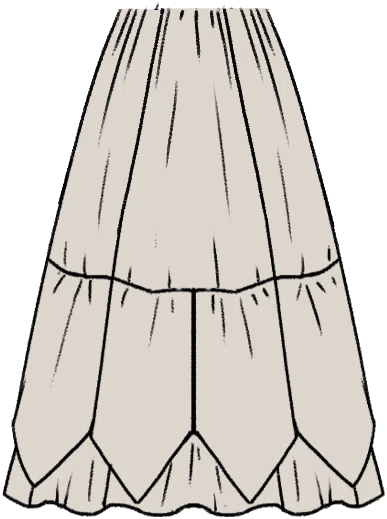
- Garment part
- Skirt
- Still missing
- Skirt Tier 1 Back missing, Skirt Tier 1 Front missing, Skirt Tier 1 Left missing, Skirt Tier 1 Right missing, Skirt Tier 2 Back Left missing, Skirt Tier 2 Back Right missing, Skirt Tier 2 Front Left missing, Skirt Tier 2 Front Right missing, Skirt Tier 2 Left missing, Skirt Tier 2 Left Back missing, Skirt Tier 2 Left Front missing, Skirt Tier 2 Right missing, Skirt Tier 2 Right Back missing, Skirt Tier 2 Right Front missing, Skirt Tier 3 Back missing, Skirt Tier 3 Front missing, Skirt Tier 3 Left missing, Skirt Tier 3 Right missing
The list changes with the variant, and that is the point of checking here rather than from the pattern's name: the same pattern can be cut into different numbers of pieces, so "I have three of the four" only means something once the variant is chosen.
08 — Leave the station and come back
Re-enter the station before you reload
Some pieces come back when the scene is built again, and it is quicker than quitting the game.
- Step away from the mannequin or cutting station you are at.
- Go back down to the shop floor.
- Enter the station again.
- Read the inventory again before you do anything else.
This one is a report rather than a rule. It costs a few seconds, which is why it sits above the reload rather than below it.
09 — Save, quit and reload
Save, quit to the desktop and load again
The recovery with the most reports behind it, and the last cheap thing to try before the dress is touched.
Launch-week reports describe pieces vanishing from the working inventory and coming back after the game was closed and the save loaded again — including pieces that disappeared right after a seam was unpicked. It is the same save; nothing is being rolled back beyond the moment the piece went missing, and the dress you have built is still there when the file opens.
- Save the game, in the slot you are already using.
- Quit all the way to the desktop rather than back to the title screen.
- Start Dressmaker again.
- Load the save and open the inventory before anything else.
This is a workaround and not a fix: it is reported to work, it does not always work, and the published notes have never described what it changes. If the piece is still absent after two attempts, it is not coming back this way.
10 — Should you restart the dress?
Only after the piece has refused to come back
Restarting is the one recovery on this page that cannot be undone, and it is the first answer most guides give.
A restart does not hunt for the missing piece. It puts the whole garment back to the beginning, which means every panel that was cut correctly is thrown away with the one that was not. That is a fair trade when the state itself is the problem, and it is a bad one when a single piece could still be waiting on the cloth or in a save.
Before you restart, find out what it does with the fabric you have already bought.
What a restart returns to you is a report rather than a guarantee, and it belongs to the page that owns it. This page stops at the decision, because the answer depends on whether the mistake reaches one panel or the whole dress.
11 — The commission will not submit
Finished the dress but the button is not there?
This is where a missing piece is usually discovered: every requirement reads as met, and the commission still will not finish.
Players have reported a commission that would not complete, with no obvious rule failing, until a piece that had gone missing was recovered and the commission went through immediately afterwards. The requirement list is not lying — a garment that is one piece short is not the garment the brief asked for, even when every line on the screen looks satisfied.
If all four checks come back clear, the missing piece is not the reason and the commission has a different problem.
- Is one piece of the garment still unplaced, rather than missing?
- Is a panel still on the fabric or the cutting table?
- Did a piece disappear after you unpicked a seam?
- Have you reloaded the save since the piece went missing?
12 — The piece is there and it is wrong
Can see the piece, but it does not fit?
A piece you cannot use is not the same as a piece you do not have, and the difference decides whether you cut anything.
- Cut from the wrong fabric: the piece is present, the cloth is not what the dress calls for.
- Cut the wrong way round: the cloth and the shape are right, the direction is not.
- The wrong piece for the slot: it belongs somewhere else in the same garment.
Questions
A piece that has gone missing: common questions
The six questions this page owns, and where each of the others is answered.
- Why did my pattern piece disappear?
- Most often it never went anywhere. A cut piece can stay on the fabric, sit further down the panel list than you looked, or belong to a different variant of the pattern than the one you are cutting, and all three look identical from the inventory screen. When a piece really has gone, it is a state the game got into rather than something you did, which is why the recovery below is a reload rather than a recut.
- Where do cut pattern pieces go?
- A cut panel stays with the garment you are working on, which is why a piece cut for one dress does not appear while you are building another. It is listed by the name the game gives it, and the current build names the mannequin slot it belongs to when you hover it — which matters most in a cut with several similarly named pieces.
- What should I do if a piece disappears after I undo a seam?
- Do not cut a replacement yet. Reports describe exactly this after a seam is unpicked and describe the piece returning after the game is closed and the save loaded again, so the reload is the step to try first. Cutting the piece again spends cloth on a piece that may still exist.
- Will closing and reopening the game bring the piece back?
- That is what players report and it is why a reload is the step with the most weight on this page, but it is a workaround rather than a promise. Save, quit all the way to the desktop, start the game again and load the same file; if the piece is still absent after two attempts, treat it as genuinely gone.
- Do I have to restart the whole dress?
- No, and reaching for it first is the expensive mistake. Restarting resets the whole garment, so every panel you cut correctly is discarded along with the missing one. It becomes the sensible answer when the state of the dress is the problem rather than one piece of it, and not before.
- Why can I not finish a commission when everything is green?
- A garment that is one piece short is not the garment the brief asked for, even when the requirement lines look satisfied. Players have reported a commission that would not complete until a missing piece was recovered, after which it went straight through. Check the piece first, and if nothing is missing, the commission has a different problem with its own page.
About this page
What this page knows, and what would change it
This page answers one state: a piece the reader has already handled cannot be found. It is not the cutting guide, which explains the room and the panels, and it is not the locked-item page, which answers a pattern that was never earned — both are handed off rather than restated. The piece lists and the counts behind them come from the same cut data this site's pattern pages render, including the pieces the checker prints, which are walked pattern by variant and chosen by rule rather than picked to look convincing. The inventory hint and the sketchbook change are read out of the published patch notes for the build named in the header, so this page cannot claim a build changed something the updates page says it did not. Two claims are player reports and are labelled as such: what re-entering a station does, and what a reload does with a piece that has disappeared. Everything above was last compared against the game's own cut lists and the published patch notes on the date in the header.
- Cutting-room behaviour reviewed through
- 410
- Piece lists taken from build
- 25482629
- Claims last checked on
- 29 settembre 2026
What would move this page
- A patch note names the vanishing piece, which would let this page answer it from the record instead of from player reports.
- A patch note changes or removes the inventory slot hint, which is the check this page tells readers to perform first.
- A patch note changes how the sketchbook presents its component names, which would move what the page says about using it as a checklist.
- Reports stop describing a reload as a recovery, which would let this page stop recommending the step it currently puts above restarting.